

Command line
bun ~/solipsist/src/index.ts [options]
  --config <file>   Use this settings file (default: ./solipsist.yaml, then ~/.config/solipsist/config.yaml).  --print-config    Print every setting, its value and where it came from, then exit.  --version         Print the version and exit.  --help            Print this and exit.
solipsist doctor    Print what a bug report needs, then exit.
Everything else is a setting, in solipsist.yaml or the environment. See
Configuration. An unknown flag is an error. It isn’t passed on to anything.
Seeing what’s in effect
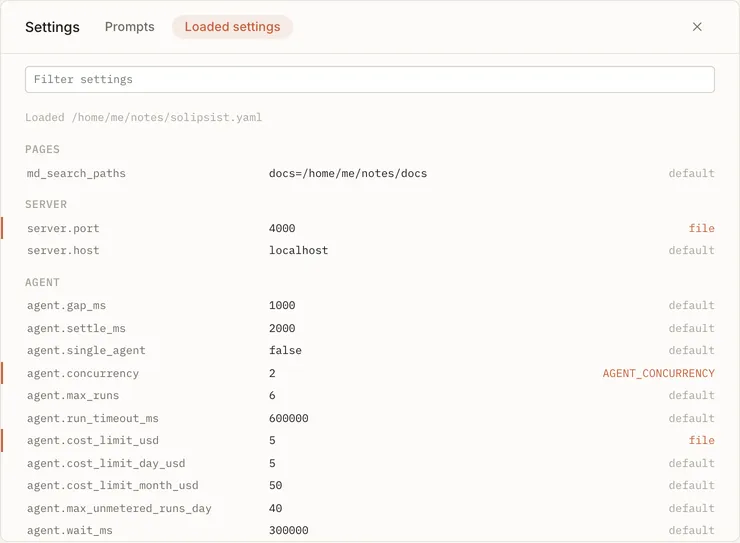
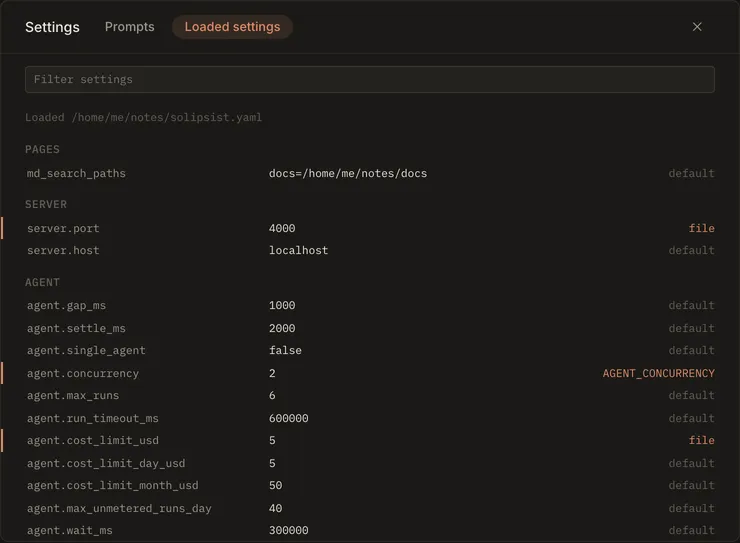
Section titled “Seeing what’s in effect”--print-config prints each setting’s value and where it came from (default, file or env:NAME). In the browser,
the Loaded settings tab in settings (the gear icon) shows the same list for the running server. Keys only ever
show as set.
One server per folder
Section titled “One server per folder”Starting Solipsist in a folder that already has one running is refused: two would write the same pages and answer every request twice. The message names the first one (its process, its address and when it started) and says what to do:
- open the address it gives, which is the one to use;
- or stop it with Ctrl+C in the terminal it runs in, or
kill <process>(taskkill /PID <process>on Windows); - if nothing is running and the message is wrong, delete the lock file it names and start again. A lock left by a crash is taken over by itself, so this is rarely needed.
The lock is a small file in your temporary folder. Nothing is written to your folder. solipsist doctor says when a
server is already running for the folder.
Reporting a problem
Section titled “Reporting a problem”If an agent can’t run, When it goes wrong may already say why.
solipsist doctor prints the version, your system, which settings file is in effect, whether the port is free, whether
the folder can be written, which agents can run (and why one can’t), and the last errors in the log. Run it in the
folder that has the problem and paste the output into the bug report. It shows no key and no page text, and your home
folder as ~.
The terminal view
Section titled “The terminal view”While the server runs, the terminal shows what each page’s agents are doing and what they cost. Set SOLIPSIST_TUI=0
to get plain log lines instead. Stopping the server (Ctrl+C) stops every agent and puts the
requests they were working on back to waiting.
For Solipsist 0.1