

How the agents work
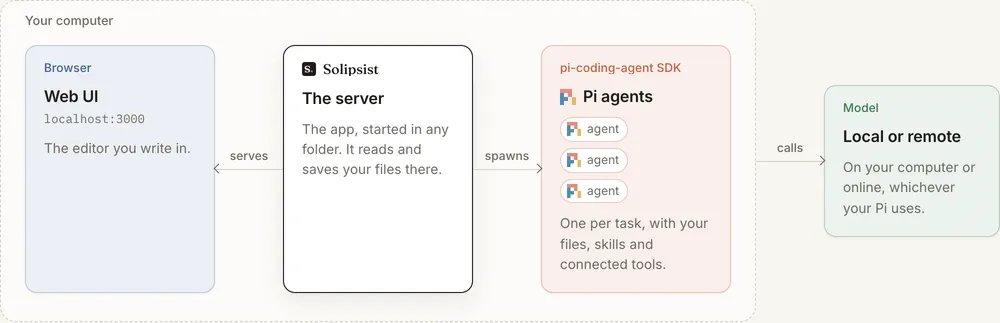
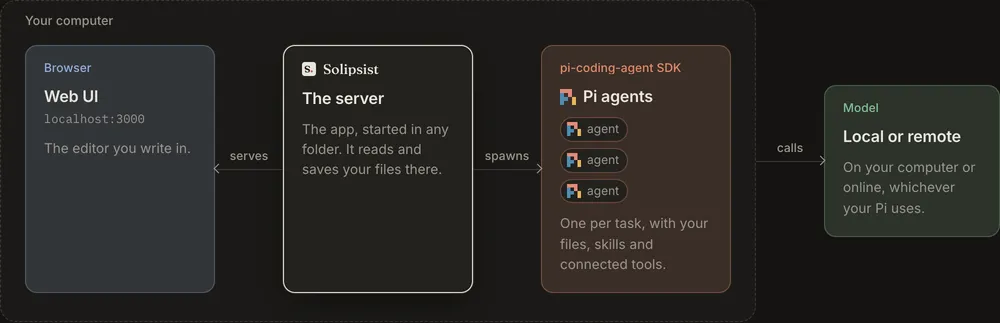
Solipsist runs in the folder your files are in. The server serves the editor to your browser and starts Pi agents inside its own process, one per request. The agents call the model you connected, whether that’s on your computer or online. Engines says what runs them and what that needs.
They keep working in the background
Section titled “They keep working in the background”- While you write, a run waits until you’ve stopped typing for a moment, so the agent doesn’t read a half-typed word. If a result arrives while you’re typing, it’s matched up with the text as it is at that moment.
- With the tab closed, the page’s agents finish what they started and pick up any requests still waiting. They stop once there’s nothing left to do and no tab is open. When you reopen the page, you see what’s still in progress.
- Scheduled buttons run on the server whether the page is open or not, as long as Solipsist is running.
- Stopping the server stops every agent. The requests they were working on go back to waiting and start again next time.
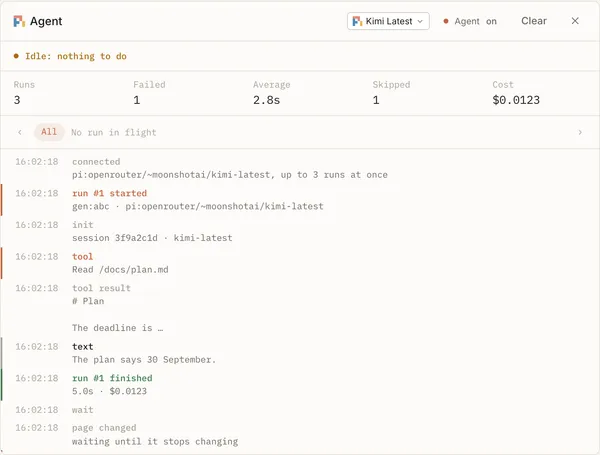
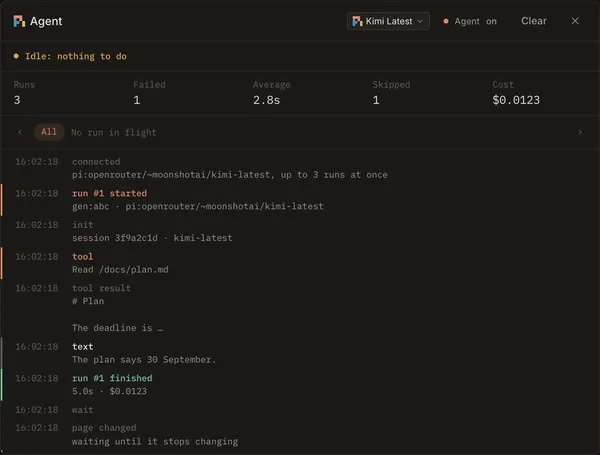
The agent panel (opened from the status bar) shows what each run is doing, step by step, and what it cost:
One agent per request
Section titled “One agent per request”Each waiting request gets its own run on a fresh agent. Up to three run at a time on a page (agent.concurrency) and
six across all pages (agent.max_runs).
When a run starts, the request is marked as in progress in the file. When it ends, the result is saved with the
request and shown to you as a suggestion. A run that takes longer than ten minutes (agent.run_timeout_ms) is stopped
and counts as failed.
An agent remembers its conversation
Section titled “An agent remembers its conversation”After its run, an agent stays around for five minutes (agent.wait_ms) in case you want to chat with it or ask again.
Then it goes to sleep and its conversation is saved. Asking again or chatting wakes it up with everything it knew. A
request always goes back to the agent that made it, on the model it used, as long as that model can still run.
Single-agent mode
Section titled “Single-agent mode”With agent.single_agent: true, a page has one long-running agent instead of one per request. Requests become turns
in its conversation, one at a time, so it remembers what it read and wrote. That helps when the requests on a page
build on each other. While you’re chatting with it, requests wait until you close the chat. The status bar’s
Single agent says which mode a page is in.
What the agents are told
Section titled “What the agents are told”Everything the agents are told is a prompt you can read and change: the protocol (how requests, markers and replies work), the prompt for each run, one for each kind of request, and the chat prompts. See Prompts, and the protocol for the exact text every agent starts with.
Spending limits
Section titled “Spending limits”New runs stop when you hit a limit:
| Setting | Default | Counts |
|---|---|---|
agent.cost_limit_day_usd |
$5 | Spend today. |
agent.cost_limit_month_usd |
$50 | Spend this month. |
agent.cost_limit_usd |
none | Spend since the server started. |
agent.max_unmetered_runs_day |
40 | Runs today whose cost isn’t reported. |
The day and month totals are rebuilt from the server’s log, so they carry over restarts. Set a limit to 0 to turn it
off. The status bar’s Cost shows what a page has spent, and the agent panel says
Stopped: cost limit reached once a limit is hit.
What an agent can touch
Section titled “What an agent can touch”An agent runs on your computer as you. Pi’s write and edit tools can only write to the images folder, but its
shell isn’t sandboxed. Treat a request the way you’d treat running Pi in a terminal in that folder.
For Solipsist 0.1