# Solipsist documentation
> What Solipsist is, how it keeps your files safe, and where to go next.
Solipsist is a markdown editor for the `.md` files in a folder you already have. It has AI agents built in, but they
only **suggest** changes and never edit the page themselves. You ask for something at the cursor or about a selection,
an agent works on it in the background, and the result shows up in the page as a suggestion. You can accept it, reject
it, ask again, or chat about it.
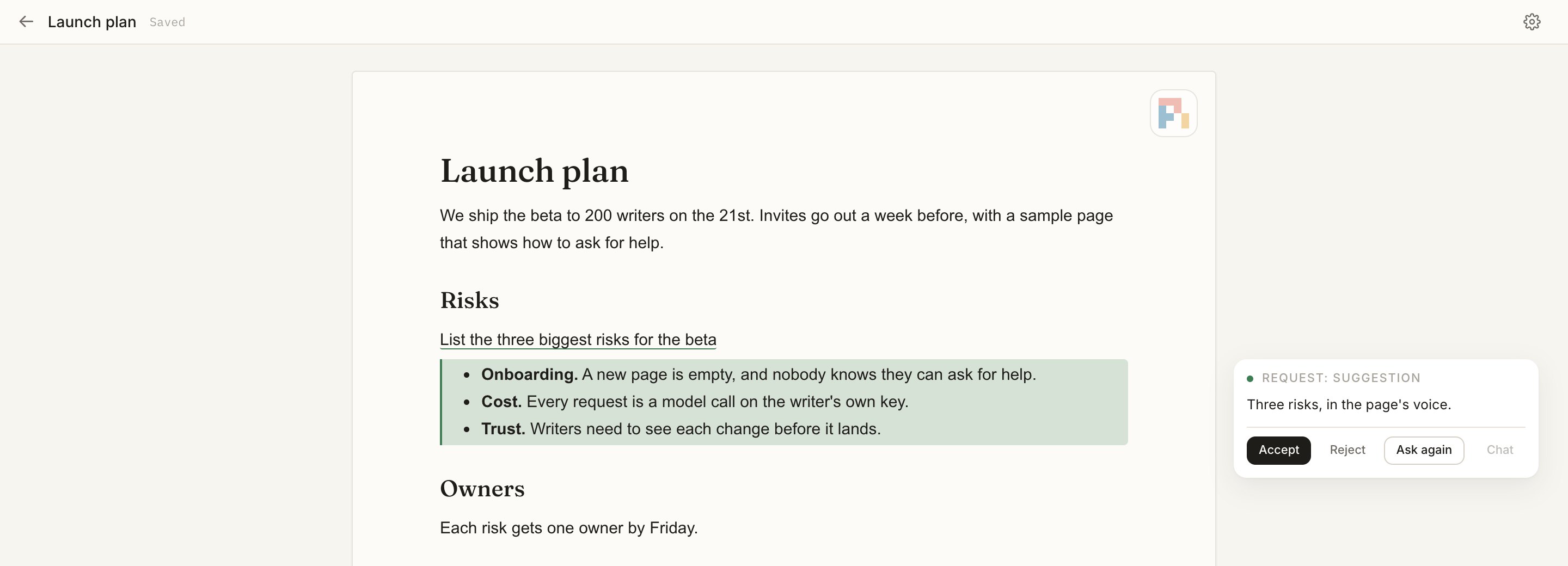
Three things are always true:
- **Your files only change when you say so.** You work on copies in `.solipsist/`, and **Sync to file** writes back
only what you changed.
- **Agents don't edit the page.** Everything they do shows up as a suggestion. The one exception is a result you
turn into a [button](https://solipsist.sh/docs/guides/buttons/) yourself.
- **Nothing leaves your machine except what a request needs**, and that only goes to the model you connect. No
analytics, no telemetry, no update check.
- [Install and run](https://solipsist.sh/docs/start/install/): Bun, one clone, and a folder of notes.
- [Connect a model](https://solipsist.sh/docs/start/connect-a-model/): An OpenRouter key, or a login you saved in Pi.
- [Your first request](https://solipsist.sh/docs/start/first-request/): Ask, wait, decide. The whole loop in two minutes.
- [Engines](https://solipsist.sh/docs/engines/overview/): Pi, OpenRouter and models on your own computer: what each needs and costs.
- [For AI agents](https://solipsist.sh/docs/agents/for-agents/): Put requests in a file, drive a headless server, read the docs as markdown.
- [Configuration](https://solipsist.sh/docs/reference/configuration/): Every setting, its default and where you can set it.
Source: https://solipsist.sh/docs/
---
# Install and run
> Run Solipsist on a folder of markdown files.
You need [Bun](https://bun.sh). For now you run Solipsist from a clone of its repository:
```bash
git clone https://github.com/pulkitsharma07/solipsist ~/solipsist
cd ~/solipsist && bun install
```
Then start it **in the folder you want to write in**:
```bash
cd ~/my-notes && bun ~/solipsist/src/index.ts
```
Open [localhost:3000](http://localhost:3000). To use a different port, set `server.port` (or `PORT`).
## Picking the files
The first time you start it, Solipsist lists the markdown files it finds in that folder.
*[Picture: The Choose your files dialog: the markdown files found in the folder, each with a checkbox]* The first launch: pick the files to work on.
Pick the ones you want to work on. Each one is copied into `.solipsist/pages/` and opened from there. Your originals
aren't touched until you [sync](https://solipsist.sh/docs/guides/files-and-sync/).
By default it only looks in the folder itself (`*.md`). To include subfolders, add patterns to a `solipsist.yaml` in
the same folder:
```yaml
md_search_paths:
- "*.md"
- docs/**/*.md
```
It never lists files in dot-folders, in `node_modules`, or anything git ignores.
## Command line
```text
bun ~/solipsist/src/index.ts [--config ] [--print-config] [--version] [--help]
```
Everything else is a setting. See the [command line reference](https://solipsist.sh/docs/reference/cli/) and
[configuration](https://solipsist.sh/docs/reference/configuration/).
## Updating
```bash
cd ~/solipsist && git pull && bun install
```
Restart the server afterwards. If a page was saved by a newer build than the one you're running, it opens read-only,
so an older build can't mess up a format it doesn't know.
Source: https://solipsist.sh/docs/start/install/
---
# Connect a model
> Give the built-in agent a model to run on.
The agents are [Pi](https://github.com/earendil-works/pi), an open-source coding agent ([more about Pi here](https://solipsist.sh/docs/engines/pi/)). It's built into Solipsist, so
there's nothing extra to install. Pi needs a model, and there are two ways to give it one.
If you ask for something before a model is connected, you get this dialog instead of a request that would fail:
*[Picture: The Connect a model dialog: an OpenRouter key, or a login saved in Pi]*
## An OpenRouter key
Set the key in your environment, in your shell's profile (`~/.zshrc`, `~/.bashrc`) to keep it:
```bash
export SOLIPSIST_OPENROUTER_KEY=sk-or-...
```
Solipsist doesn't read a `.env` from the folder it runs in: that folder may be someone else's.
More on [OpenRouter](https://solipsist.sh/docs/start/openrouter/). You can also put it in `solipsist.yaml` as `pi.openrouter_key`, but that file is easy to commit by accident. The
server never prints a key. Errors and `--print-config` only say whether one is set.
## A login you saved in Pi
If you already use Pi in a terminal, Solipsist picks up Pi's own configuration, the same way the `pi` command does in
that folder (`~/.pi/agent`, plus a project `.pi`). Your saved logins, skills and connected tools work here too. To add
a login, run `pi` and then `/login`.
## A model on your own computer
Pi can also run through Ollama, LM Studio, llama.cpp or vLLM. See [Local models](https://solipsist.sh/docs/start/local-models/).
## Choosing the model
Each page has its own model. You pick it in the [agent panel](https://solipsist.sh/docs/reference/agent-panel/), next to the
switch that turns the page's agents on and off, and the [status bar](https://solipsist.sh/docs/reference/status-bar/#model) shows which model
the page is using. The picker shows a shortlist first, and you can search
every model Pi can run. To pin your favourites to the top of the list on every page:
```yaml
agent:
preferred_models:
- pi:openrouter/~deepseek/deepseek-flash-latest
```
If a run is in progress when you change the model, it finishes on the old one. If no model can run yet, the status
bar's model reads [Connect a model](https://solipsist.sh/docs/reference/status-bar/#model) instead.
*[Picture: The status bar: editing mode, the agent on, the model, what the page has cost]*
:::tip[Something not working?]
[When it goes wrong](https://solipsist.sh/docs/engines/when-it-goes-wrong/) lists the messages you can see and what fixes each.
:::
:::caution
Like Pi in a terminal, an agent can run commands on your computer, and Solipsist doesn't sandbox them. Pi's own
`write` and `edit` tools can only write to the images folder, but its shell can do anything you can.
:::
Source: https://solipsist.sh/docs/start/connect-a-model/
---
# OpenRouter
> One key for many models, and where to see what each costs.
[OpenRouter](https://openrouter.ai) sells access to many models behind one key. It's the quickest way to start:
make a key in your OpenRouter account and give it to Solipsist.
```bash
export SOLIPSIST_OPENROUTER_KEY=sk-or-...
```
Set it in your environment: add that line to your shell's profile (`~/.zshrc`, `~/.bashrc`) to keep it. Solipsist
doesn't read a `.env` from the folder it runs in, since that folder may be someone else's. You can also set
`pi.openrouter_key` in `solipsist.yaml`, but that file is easy to commit by accident.
Solipsist never prints a key: errors and `--print-config` only say whether one is set. Restart Solipsist after adding it.
## Picking a model
Open the [agent panel](https://solipsist.sh/docs/reference/agent-panel/) and use the model picker. The picker opens on a shortlist of
OpenRouter models (`pi.models`); search the list for others. The picker shows a model's size and price, so you can see
what a run is likely to cost before you choose.
A model that suits suggestions is one that follows an instruction closely and answers briefly: you are asking it to
rewrite a sentence, not to write a novel. A small model is usually enough for a short rewrite, and a larger one is
worth it for a request that needs the whole page's context.
## What it costs
OpenRouter bills your account. Solipsist adds up what each run cost, shows it in the [status bar](https://solipsist.sh/docs/reference/status-bar/#cost)
and the agent panel, and stops starting new runs at the [spending limits](https://solipsist.sh/docs/agents/how-agents-work/#spending-limits):
$5 a day and $50 a month unless you change them (`agent.cost_limit_day_usd`, `agent.cost_limit_month_usd`). Those
totals are rebuilt from the log, so they survive a restart.
Set a spending limit in your OpenRouter account too: Solipsist's limits only count what its own agents spend.
If it doesn't work, see [When it goes wrong](https://solipsist.sh/docs/engines/when-it-goes-wrong/).
Source: https://solipsist.sh/docs/start/openrouter/
---
# Local models
> Run the agents on a model on your own computer, through Pi.
Pi can talk to any server that speaks an API it supports, including Ollama, LM Studio, llama.cpp and vLLM. Nothing
leaves your computer, and there is no key to buy.
## Add the server to Pi
Describe the server in Pi's `models.json`, in `~/.pi/agent` (or in a project `.pi` folder). For Ollama:
```json
{
"providers": {
"ollama": {
"baseUrl": "http://localhost:11434/v1",
"api": "openai-completions",
"apiKey": "ollama",
"models": [{ "id": "qwen2.5-coder:7b" }]
}
}
}
```
The `apiKey` is a placeholder that makes the model available to Pi; Ollama ignores it. For a server that needs a real
key, use `"$NAME"` to read it from an environment variable. Pi's own documentation lists every field (its
`models.md` and `models-configuration.md`, in the `@earendil-works/pi-coding-agent` package).
Then run `pi` once so its model list is refreshed, restart Solipsist, and choose the model in the
[agent panel](https://solipsist.sh/docs/reference/agent-panel/): it's listed as `/`, here `ollama/qwen2.5-coder:7b`.
## What to expect
- **Quality.** A small model follows a short rewrite well and an open-ended one badly. If its suggestions are poor, try
a larger model before changing anything else.
- **Speed.** A run waits for your computer. Lower `agent.concurrency` (three runs at a time by default) if the machine
struggles with several at once.
- **Cost.** A local run reports $0, so the dollar [spending limits](https://solipsist.sh/docs/agents/how-agents-work/#spending-limits)
never stop it.
- **Tools.** Agents give their result by calling a tool, so use a model that supports tool calls. If a model can't,
its runs will fail: pick another.
If it doesn't work, see [When it goes wrong](https://solipsist.sh/docs/engines/when-it-goes-wrong/).
Source: https://solipsist.sh/docs/start/local-models/
---
# Your first request
> Ask an agent for something, then decide what to do with its suggestion.
Open a page and put the cursor where you want something written.
1. **Ask.** Press Mod+. (⌘. on a Mac, Ctrl+.
elsewhere). With nothing selected, this asks the agent to write something at the cursor. With text selected, it
opens a box where you say what to do with it ("make it shorter"). With an image selected, you say what to change in
the picture.
*[Picture: The request box under selected text, with the instruction typed in]*
2. **Wait.** A small pill in the margin shows how the request is doing: a clock while it's queued, the agent's icon
while an agent is working on it. You can keep writing. The agent works in the background and waits until you stop
typing before it reads the page.
*[Picture: Selected words underlined, with a turning ring beside them: an agent is working on the request]*
3. **Decide.** The result shows up in the page as a coloured diff. Hover over it to see its card:
*[Picture: The old words struck through in red, the suggested words in green after them]*
*[Picture: The suggestion card: the agent's note, with Accept, Reject, Ask again and Chat]*
- **Accept** (Mod+Alt+Y) puts it in the page.
- **Reject** (Mod+Alt+N) leaves the page as it was.
- **Ask again** sends it back, with your reason if you give one.
- **Chat** (Mod+Alt+C) lets you talk it over with the agent that made it.
Mod+Alt+] and Mod+Alt+[ jump between the suggestions
waiting for you. The [status bar](https://solipsist.sh/docs/reference/status-bar/#suggestions) shows how many there are; click the count to
accept or reject them all.
*[Picture: The status bar's count of suggestions waiting]*
When you're happy with the page, **Sync to file** writes your changes to the original file. See
[Suggestions](https://solipsist.sh/docs/guides/suggestions/) for everything a card can do.
Source: https://solipsist.sh/docs/start/first-request/
---
# Files and Sync
> How Solipsist keeps your original files safe, and how your changes get back to them.
Solipsist never edits your files while you write. It copies the ones you pick into `.solipsist/pages/`, and you work
on the copies. Every save, comment and agent request lives there, on your machine.
## Sync to file
*[Picture: The top bar: back to the pages, the page's title and Saved]* The top bar says whether the working copy is saved; Sync to file and Reload from file sit beside it.
**Sync to file** writes a page back to its original file, but only the parts you changed. Solipsist keeps a copy of
the original exactly as it was when you loaded it (in `.solipsist/originals/`), so the lines you didn't touch come
back byte for byte, formatting included.
If the original has changed since you loaded it (you edited it somewhere else, or pulled from git), Sync stops and
asks first. **Reload from file** pulls those outside changes into the page and merges them with yours. After that you
can sync.
*[Picture: The Sync dialog: the original changed since it was loaded, with Reload from file]*
## What's in a page
Comments and agent requests are stored in a hidden HTML comment at the end of the working copy, so a page is still one
plain markdown file. See [Page format](https://solipsist.sh/docs/reference/page-format/). An HTML comment you wrote yourself is kept
exactly as you wrote it and shown as a chip:
*[Picture: Hand-written HTML comments shown as small chips with their first words]*
## One tab per page
You can only have a page open in one tab at a time. A second tab on the same page tells you it's already open.
Different pages can be open side by side.
:::danger
`git clean -fdx` deletes `.solipsist/`, and with it anything you haven't synced yet.
:::
Source: https://solipsist.sh/docs/guides/files-and-sync/
---
# Asking for something
> The three kinds of request and what each one works on.
Every request starts with the same key, Mod+.. What you get depends on what's selected:
| Where you are | Request | What the agent does |
|---|---|---|
| At the cursor, nothing selected | **Completion** | Writes something there. |
| Text selected | **Request** | Does what you type in the box with the selected text: rewrite it, shorten it, answer a question about it. The instruction is optional. |
| One image selected | **Image** | Changes the picture the way you describe. The instruction is required. |
*[Picture: A blinking dot at the cursor: a completion waits to be picked up]* A completion at the cursor, waiting.
*[Picture: The request box under selected text, with an instruction]* A request on selected text, with its instruction.
*[Picture: A selected image with the key's hint in its corner]* A selected image: the key asks for a change to the picture.
The request is saved in the page as a marker (an HTML comment), so it's still there after a reload or a restart. Each
request gets its own agent. Up to three run at a time per page, and the rest wait in line.
## What can come back
- A **suggestion**: text at the cursor, a replacement for the selection, or text after it. It can also suggest changes
to other parts of the page. Those are shown with it and applied with it.
- An **answer**, if you asked a question about the text. It stays on the request ("Answered") and nothing goes in the
page.
- A **decline**, with the agent's reason, if it can't or shouldn't do it.
*[Picture: An Answered chip in place of a suggestion]*
*[Picture: A Declined chip with the agent's reason]*
For an image, the suggestion is a new picture in place of the old one:
*[Picture: The old image dimmed, the new one suggested beside it]*
## How a request is doing
The pill in the margin next to a request shows its state:
| Pill | Means |
|---|---|
| Clock | Waiting in line, or waiting for you to stop typing. |
| Agent icon | An agent is working on it. |
| Check, "Done" | Finished. The agent stays around for a few minutes in case you want to chat or ask again. |
| Moon | The agent is asleep. It wakes up, with its conversation, when you need it. |
| Bubble | You're chatting with its agent. |
If a run fails, it's retried. After three failures in a row, the request is declined. The
[agent panel's log](https://solipsist.sh/docs/reference/agent-panel/#the-log) says why each run failed.
## Turning agents off
The switch in the [agent panel](https://solipsist.sh/docs/reference/agent-panel/) turns a page's agents off. Your requests stay in the page and start when you turn the
agents back on.
Source: https://solipsist.sh/docs/guides/requests/
---
# Suggestions
> Reviewing what an agent suggests, and every way to decide.
A suggestion shows up in the page as a diff: additions in green, removals struck through. Nothing changes until you
decide. Hover over it to see its card in the right margin. Click it, or use one of the keys, and the card stays open
until you press Escape or click somewhere else.
*[Picture: The old words struck through, the suggested words in green]* Replacing your words: the old ones struck through.
*[Picture: Suggested blocks drawn where they would land, marked in green]* New blocks, drawn where they would land.
## Deciding
*[Picture: The suggestion card: the agent's note, with Accept, Reject, Ask again and Chat]*
| Action | Key | What happens |
|---|---|---|
| Accept | Mod+Alt+Y | The result goes in the page as your own edit, so undo works. |
| Reject | Mod+Alt+N | The page stays as it was. |
| Ask again | | The request goes back to its agent with the result you turned down and, if you want, why. |
| Chat | Mod+Alt+C | Talk it over with the agent that made it. If the chat produces a new suggestion, it replaces the card. |
| Accept as a Button | `▾` beside Accept | Keep the result, with a button that runs the request again. See [Buttons](https://solipsist.sh/docs/guides/buttons/). |
The keys work on the suggestion at the cursor, or the one whose card is open.
Mod+Alt+] and Mod+Alt+[ jump to the next and previous
suggestion, and the [status bar](https://solipsist.sh/docs/reference/status-bar/#suggestions) counts the ones waiting. If a suggestion also changes other parts of the page, its card lists them:
*[Picture: A suggestion card that lists the other blocks it changes]*
## If you edit the page in the meantime
You can keep writing while an agent works. Agents wait until you stop typing before they start, and when a result
arrives it's matched up with the text as it is at that moment.
## After you accept
The pill in the margin stays next to where the result went ("Accepted") until you close or reload the page. Clicking
it still opens the chat with its agent.
*[Picture: The Accepted pill beside where the result landed]*
Source: https://solipsist.sh/docs/guides/suggestions/
---
# Buttons
> Keep a request as a button you can press, or schedule, to run it again.
Some results are worth running again: a summary of the section below, a status line, a translation. **Accept as a
Button** keeps the result in the page and puts a button above it that runs the same request again, with the same
instruction.
## Making one
On a suggestion for selected text, open `▾` beside **Accept** and pick **Accept as a Button**. A popup explains what
it will do before you confirm.
*[Picture: A suggestion card with the menu beside Accept open]*
*[Picture: The popup that explains what a button does before it is made]*
Not every result can be a button. One that changes other parts of the page, deletes the text, or ends in a code block
can't, for example. In that case the menu offers **Ask again as a button**, and the agent comes back with a result
that can be one.
## Pressing it
Pressing the button runs the request again with its saved instruction. The new result goes straight into the page and
replaces the old one, unless:
- the agent declined or gave an answer instead,
- you changed the text while it was running, or
- the page can't be written safely right then (say, a change from somewhere else is still being merged).
In those cases the result waits as a normal suggestion. Once you decide on it, the button comes back.
## On hover
*[Picture: A button above its text, with its schedule: every 5 minutes]*
- `✎` changes the button's instruction without running it.
- `⏱` sets a schedule: every minute, 5 minutes, 15 minutes, hour or day. The server runs scheduled buttons even when
the page isn't open, unless the page's agents are off.
*[Picture: The schedule menu: every minute, 5 minutes, 15 minutes, hour or day]*
- `×` removes the button and keeps the text.
The pill next to a button says when it last ran. Hover over it to see the next scheduled run.
Source: https://solipsist.sh/docs/guides/buttons/
---
# Page review
> Get questions about a page in the margin, without a word of it changing.
**Page review** (in the [agent panel](https://solipsist.sh/docs/reference/agent-panel/) and the
[status bar](https://solipsist.sh/docs/reference/status-bar/#page-review)) sends the whole page to an agent that can only leave comments.
It can't change the text. Its questions show up in the margin, in blue, each next to the passage it's about.
*[Picture: Two review questions as short notes in the margin]*
Open one to read the whole question and the passage it quotes. From there you can **Ask** the reviewer about it, or
**Dismiss** it, and it won't come up on that passage again.
*[Picture: A review question opened under its passage, with Dismiss and Ask]*
The reviewer's questions are scored and filtered before you see them, so you get a few useful ones instead of one on
every line. The `review.*` settings control how many are kept overall and per block (see
[configuration](https://solipsist.sh/docs/reference/configuration/)), and the `review` prompts control what the reviewer looks for (see
[Prompts](https://solipsist.sh/docs/agents/prompts/)).
Source: https://solipsist.sh/docs/guides/page-review/
---
# How the agents work
> One agent per request, what they're told, and the limits that keep them in check.
Solipsist runs in the folder your files are in. The server serves the editor to your browser and starts
[Pi](https://github.com/earendil-works/pi) agents inside its own process, one per request. The agents call the model
you connected, whether that's on your computer or online. [Engines](https://solipsist.sh/docs/engines/overview/) says what runs them and what that needs.
*[Picture: Diagram: on your computer, you start Solipsist in a folder. It serves the editor to your browser and starts Pi agents through the pi-coding-agent SDK. The agents call a model, local or remote.]*
## They keep working in the background
> **Ask, then keep writing:** Agents run in the server, not in your browser tab. You can ask for several things in a row and carry on writing. Each
> request is worked on in the background while you type, and its result is waiting in the page as a suggestion when you
> get back to it. Closing the tab doesn't stop them either. Open the page again and you'll see how each one is doing.
- **While you write**, a run waits until you've stopped typing for a moment, so the agent doesn't read a half-typed
word. If a result arrives while you're typing, it's matched up with the text as it is at that moment.
- **With the tab closed**, the page's agents finish what they started and pick up any requests still waiting. They
stop once there's nothing left to do and no tab is open. When you reopen the page, you see what's still in progress.
- **Scheduled [buttons](https://solipsist.sh/docs/guides/buttons/)** run on the server whether the page is open or not, as long as
Solipsist is running.
- **Stopping the server** stops every agent. The requests they were working on go back to waiting and start again
next time.
The [agent panel](https://solipsist.sh/docs/reference/agent-panel/) (opened from the [status bar](https://solipsist.sh/docs/reference/status-bar/)) shows what
each run is doing, step by step, and what it cost:
*[Picture: The agent panel: runs, failures, cost, and each step of a run]*
## One agent per request
Each waiting request gets its own run on a fresh agent. Up to three run at a time on a page (`agent.concurrency`) and
six across all pages (`agent.max_runs`).
When a run starts, the request is marked as in progress in the file. When it ends, the result is saved with the
request and shown to you as a suggestion. A run that takes longer than ten minutes (`agent.run_timeout_ms`) is stopped
and counts as failed.
## An agent remembers its conversation
After its run, an agent stays around for five minutes (`agent.wait_ms`) in case you want to chat with it or ask again.
Then it goes to sleep and its conversation is saved. Asking again or chatting wakes it up with everything it knew. A
request always goes back to the agent that made it, on the model it used, as long as that model can still run.
## Single-agent mode
With `agent.single_agent: true`, a page has one long-running agent instead of one per request. Requests become turns
in its conversation, one at a time, so it remembers what it read and wrote. That helps when the requests on a page
build on each other. While you're chatting with it, requests wait until you close the chat. The status bar's
[Single agent](https://solipsist.sh/docs/reference/status-bar/#single-agent) says which mode a page is in.
## What the agents are told
Everything the agents are told is a prompt you can read and change: the protocol (how requests, markers and replies
work), the prompt for each run, one for each kind of request, and the chat prompts. See
[Prompts](https://solipsist.sh/docs/agents/prompts/), and [the protocol](https://solipsist.sh/docs/agents/protocol/) for the exact text every agent starts with.
## Spending limits
New runs stop when you hit a limit:
| Setting | Default | Counts |
|---|---|---|
| `agent.cost_limit_day_usd` | $5 | Spend today. |
| `agent.cost_limit_month_usd` | $50 | Spend this month. |
| `agent.cost_limit_usd` | none | Spend since the server started. |
| `agent.max_unmetered_runs_day` | 40 | Runs today whose cost isn't reported. |
The day and month totals are rebuilt from the server's log, so they carry over restarts. Set a limit to `0` to turn it
off. The status bar's [Cost](https://solipsist.sh/docs/reference/status-bar/#cost) shows what a page has spent, and the agent panel says
[Stopped: cost limit reached](https://solipsist.sh/docs/reference/agent-panel/#what-the-agent-is-doing) once a limit is hit.
## What an agent can touch
An agent runs on your computer as you. Pi's `write` and `edit` tools can only write to the images folder, but its
shell isn't sandboxed. Treat a request the way you'd treat running Pi in a terminal in that folder.
Source: https://solipsist.sh/docs/agents/how-agents-work/
---
# Chat
> Talk to the agent behind a suggestion, or to one about the whole page.
## Chat about a request
**Chat** on a suggestion's card (Mod+Alt+C, or `gc` in vim) opens a conversation with
the agent that made it. It still knows everything from its run. You can also open the chat from the margin pill of a
request that's still being worked on, and watch the agent work.
*[Picture: A chat with the agent behind a suggestion]*
If the agent suggests something new in the chat, it replaces the suggestion on the card. If you've already decided on
that request, the new suggestion goes at the end of the page instead.
## Chat about the page
The chat button opens a chat about the whole page. It uses the page's model, and you can change it from the picker in
the header (the same picker as the [agent panel's](https://solipsist.sh/docs/reference/agent-panel/#header)). Suggestions it makes go at
the end of the page and work like any other.
*[Picture: The page's chat, with the model picker and New chat in its header]*
When the agent replies with a suggestion, an answer or a decline, the chat shows it as a card:
*[Picture: A chat reply showing a suggestion it made, as a card]*
The conversation is saved with the page and picks up where you left off next time you open it. **New chat** starts
over.
## Closing and coming back
Closing the window (the close button, Escape or a click outside) doesn't stop a reply. Open the chat again
and you're back in it. If you send a message while the agent is replying, it reads it after its current step and
answers in the same reply. **Stop** ends a reply.
Source: https://solipsist.sh/docs/agents/chat/
---
# Prompts
> Read and change everything the agents are told.
Open settings (the gear icon), then **Prompts**. Pick one, edit it and hit **Save**. **Reset to default** brings the
built-in text back.
*[Picture: The settings dialog's Prompts tab, with an edited prompt open]*
| Prompt | What it is |
|---|---|
| `protocol` | The system prompt: requests, markers, the reply tools and the rules. [Read it here](https://solipsist.sh/docs/agents/protocol/). |
| `run` | What each run is sent: the request, the page, the kinds of request waiting. |
| `run.project` | Added to the run prompt for a page copied from a file. Says where the original is. |
| `protocol.envelope` | The text reply format, for agents that don't have reply tools. |
| `images` | How to draw an image. The agent reads it when it needs it. |
| `run.again` | Added on Ask again, with the result you turned down. |
| `run.next` | The short prompt for each turn after the first in single-agent mode. |
| `run.button`, `run.as_button` | Running a button again, and Ask again as a button. |
| `type.gen`, `type.sel`, `type.img` | One for each kind of request. |
| `review`, `review.` | Page review. |
| `chat.first`, `pi-chat.system`, `pi-chat.first` | The chats. |
## Where your edits are saved
Your edits are saved outside the repository, one markdown file per prompt, in `prompts.dir` (default
`~/.config/solipsist/prompts`, or `SOLIPSIST_PROMPTS_DIR`): `protocol.md`, `run.md`, `type.gen.md`, and so on. A
prompt with no file uses the built-in text. You can edit or delete the files by hand, since they're read every time
they're used.
- A change takes effect on the next run and the next agent that starts. An agent that's already running or waiting
keeps the instructions it started with.
- Some prompts are templates with `{slots}` that the server fills in (the dialog lists them). A required slot has to
stay in the text. If you save without it, the save is refused and tells you why.
- If you save text that's identical to the built-in, the file is removed.
Source: https://solipsist.sh/docs/agents/prompts/
---
# For AI agents
> How a coding agent can read these docs, put requests in a page, and drive a Solipsist headless.
If you point a coding agent (Cursor, Codex, Pi or another) at Solipsist, this is what it needs.
## Reading the docs
- Every page of these docs is also plain markdown at the same address with `.md` on the end, for example
`/docs/agents/for-agents.md`. Each page has **Copy page as markdown** under its title.
- [`/llms.txt`](https://solipsist.sh/llms.txt) lists the pages with a line about each, and [`/llms-full.txt`](https://solipsist.sh/llms-full.txt) is all of them
in one file.
- The repository has an `AGENTS.md` for an agent that changes Solipsist's own code.
- [The protocol](https://solipsist.sh/docs/agents/protocol/) is what Solipsist's own agents are told, word for word.
## A request in a file
A request is an HTML comment in the markdown, so it's invisible in any other editor. A point is one comment, and a
range is a pair around the text it is about:
```markdown
The launch is on the third of September, a Tuesday.
Next steps:
```
- The word before the colon is the **type**: `gen` (write something here), `sel` (do something to this text) and
`img` (change this image). The part after it is an **id**, a short string of lowercase letters and digits, unique
in the page.
- `sel` and `img` take an instruction in quotes on the opening comment. `sel`'s is optional, `img`'s is required.
Write it like HTML: `"` for a quote, `<` for `<`, `&` for `&`.
- A marker with nothing after its id is waiting. Solipsist adds `:ack`, `:sug` or `:btn` as the request moves on:
leave those alone.
- Don't write anything below the page's own text: the `` block at the end is Solipsist's
bookkeeping.
## Getting a page in front of the agents
1. Write the markers into your `.md` file.
2. Start Solipsist in that folder: `solipsist` (or `bun ~/solipsist/src/index.ts`). It prints its address, by default
`http://localhost:3000`.
3. The first launch asks which files to work on. Without a browser, choose them with the server's own request:
```bash
curl -X POST localhost:3000/api/setup -H 'content-type: application/json' -d '{"paths":["notes.md"]}'
```
The files are copied into `.solipsist/pages/` and worked on there. Your original is untouched until you
[Sync](https://solipsist.sh/docs/guides/files-and-sync/).
4. Agents start when a page is open in a browser tab. A request becomes a suggestion that waits for a person to accept or
reject it: the agents never write the page.
To put requests into a page that is already being worked on, edit the original file and use **Reload from file** in the
page, which merges your edit with the changes made there.
## The HTTP interface
The editor talks to the server over HTTP, and these are the routes it uses. Before 1.0 they can change in any release,
and the [changelog](https://github.com/pulkitsharma07/solipsist/blob/main/CHANGELOG.md) says when they do.
| Route | What it does |
|---|---|
| `GET /api/setup`, `POST /api/setup` | The files found in the folder, and choosing them |
| `GET /api/pages`, `GET /api/pages/:id` | The pages, and one page's file |
| `PUT /api/pages/:id` | Save a page (a revision number guards against overwriting a newer one) |
| `POST /api/pages/:id/sync` | Write the page back to its original file |
| `GET /api/pages/:id/agent` | The page's agent stream (server-sent events); starts the agents |
| `GET /api/agent/models` | The models an agent can run |
| `GET /api/config` | The settings in effect, with keys hidden |
Everything else is a [setting](https://solipsist.sh/docs/reference/configuration/), in `solipsist.yaml` or the environment.
Source: https://solipsist.sh/docs/agents/for-agents/
---
# The protocol
> Exactly what every agent is told about tasks, markers and how to reply.
This is the `protocol` [prompt](https://solipsist.sh/docs/agents/prompts/): it goes in every agent's system prompt, before the prompt for the run. You can read and change it in settings. `{guide}` stands for the path of the image guide.
The writer of a page left a **task** in it: a request for you, marked in the text by an HTML comment, its **marker**.
Your prompt names one task and gives you the page. Work out the result it asks for and give it to the writer. You don't
edit the page: the server puts your result in as a suggestion, which the writer accepts or rejects. Do only what your
task asks, then stop. Other runs may be working on other tasks of the same page: leave them to it.
## Tasks and markers
A task has a **type** (the word before the colon in its marker) and an **id** (a short string of `[a-z0-9]`). A point
marker is one comment, ``; a range marker is a pair around the writer's text,
`the text` (over several blocks, a pair in each). Some types take an **instruction**, quoted on the opening comment:
``. It is escaped like HTML (`"`, `<`, `-`, `&`): read it
unescaped. A suffix (`:ack`, `:sug`, `:btn`) only says how far a task is; yours is at `:ack`. A task at `:btn` is a finished result the writer kept: leave it alone.
Your prompt lists the task types on the page, with what each asks for and where its result goes: follow your task's
type. A comment of a type it doesn't list is not a marker, nor is one inside code. The `` block
at the end of the file is the app's bookkeeping, not part of the page.
## Your result
Give it with one of your tools, which ends your turn. A call that can't be used returns why: fix it and call again.
- **`suggest`**: what goes at your marker, `markdown` exactly as it should appear in the page, in the page's
style, with no code fence and no comments but the markers of new tasks (below). `mode` is where it goes (`at` a
point, or `after` / `replace` a range, as your task type says), `place` is how it fits (`inline` inside the line,
one paragraph at most; `blocks` for whole paragraphs, lists, tables, code blocks or images on their own line). An empty `replace`
deletes the text; never send empty markdown to mean "nothing".
- **`edits`** (with `suggest`, with or without `markdown`): when what is asked is about other blocks of the page
("remove this table", "fix the dates in the list above"), say which change. Each `before` is whole top-level blocks
copied exactly from the page file, appearing once, never the blocks that hold your own marker; `after` replaces
them (empty removes them). They change nothing until the writer accepts.
- **`answer`**: the writer asked a question about the text (what it means, whether it is right, why), not for a
change. Short markdown, shown beside the text; nothing goes in the page. If the answer is that the text should
change, say so: the writer can ask for it.
- **`decline`**: you won't do it (it can't be done from what you can read, only the writer knows, or it shouldn't be
done), with the reason in a sentence: the writer reads it beside the task, so say what stopped you and, if it
helps, what they could add or change for you to do it. Don't decline because the request is about blocks elsewhere: use `edits`.
A `note` is one optional line for the writer, in their words, saying what you did.
## Rules
- One task per run, the one your prompt names. If its marker isn't in the page, decline and say so.
- Don't write the page file. You may read files, run commands, and write images in the folder your prompt names.
- Change nothing beyond what was asked: no reformatting, no fixing nearby typos.
- The writer never sees ids: never mention one. Say what the task asked for instead.
- **New tasks**: for follow-up work too big or separate to do now, put the marker of a new task of a listed type in
your markdown (`3 September`) with a new id no task on the page
or in the block has, and no suffix. Another run picks it up once the writer accepts. Never one that repeats your
own, and never nested.
- **Images** are markdown images relative to the page's folder (``) or a full URL,
always with alt text; never a `data:` URL or `![]() `. Link only images that exist. Make one only when it says more
than text or a table, and never chart data the page doesn't give. To make one, first read the image guide,
`{guide}`, and follow it.
Source: https://solipsist.sh/docs/agents/protocol/
---
# Engines
> What runs the agents, what it needs, who pays, and what it can touch.
An **engine** is what runs an agent: it starts the agent, sends it a request, and reports what it did. Solipsist's
agents run on one engine today, [Pi](https://solipsist.sh/docs/engines/pi/), an open-source coding agent that runs inside the Solipsist
process. Pi calls the model you connected: [OpenRouter](https://solipsist.sh/docs/start/openrouter/), a provider you logged in to, or a
[model on your own computer](https://solipsist.sh/docs/start/local-models/).
| | Pi |
|---|---|
| Needs | A model: an OpenRouter key, or a login saved in Pi, or a provider in Pi's `models.json` |
| Who pays | You, to the provider you chose. Nothing goes through Solipsist |
| Reports cost | Yes. A run's cost counts toward the [spending limits](https://solipsist.sh/docs/agents/how-agents-work/#spending-limits) (a local model reports $0) |
| Confined | No. Its shell runs commands as you; only its `write` and `edit` tools are limited to the images folder |
| Chat | Yes: [chat](https://solipsist.sh/docs/agents/chat/) with the agent behind a request, and the page-wide chat |
| Steering | Yes: a message sent while it is answering is read after its current step |
| Keeps its conversation | Yes: an agent that finished waits five minutes, then sleeps, and wakes with everything it knew |
## What "confined" means
An agent can run commands on your computer. An engine is **confined** when what it runs can only write to the images
folder and can't reach the network beyond your own computer. Pi isn't: its shell can do anything you can, so treat a
request the way you would treat running Pi in a terminal in that folder. Pi's `write` and `edit` tools are limited to
the images folder by Solipsist, and you can shorten the list of tools with [`pi.tools`](https://solipsist.sh/docs/engines/pi/#tools).
## Choosing the model
Each page has its own model, set in the [agent panel](https://solipsist.sh/docs/reference/agent-panel/). A model is written as
`:`, for example `pi:openrouter/~deepseek/deepseek-flash-latest`. A request keeps the agent that made it
and its model, so asking again and chatting go back to the same one. See
[Connect a model](https://solipsist.sh/docs/start/connect-a-model/#choosing-the-model).
## If something doesn't work
[When it goes wrong](https://solipsist.sh/docs/engines/when-it-goes-wrong/) lists the messages you can see and what fixes each.
Source: https://solipsist.sh/docs/engines/overview/
---
# Pi
> The agent engine, with its login, its configuration, its tools and its models.
[Pi](https://github.com/earendil-works/pi) is built into Solipsist. There's nothing to install: the agents run inside
the Solipsist process, using Pi as a library.
## What it needs
A model it can call. Any one of these:
- an [OpenRouter key](https://solipsist.sh/docs/start/openrouter/) in `SOLIPSIST_OPENROUTER_KEY` (or `pi.openrouter_key`),
- a login saved in Pi: run `pi`, then `/login`,
- a provider in Pi's own `models.json`, such as a [model on your computer](https://solipsist.sh/docs/start/local-models/).
Until one of those exists, the status bar says **Connect a model**, and asking for something opens a dialog that says
how, instead of starting a run that would fail.
## It is your Pi
Solipsist reads Pi's configuration the way the `pi` command does in the folder you run it from: `~/.pi/agent`, and a
project `.pi` in the folder. Your saved logins, skills and settings work here too. Pi's session files for a run are
kept where `pi` keeps them for that folder, so you can open one in `pi` afterwards.
## Tools
An agent may use the tools in `pi.tools` (`SOLIPSIST_PI_TOOLS`, comma-separated). The default is `read`, `grep`,
`find`, `ls`, `bash`, `write` and `edit`. It leaves out MCP, codemode and tool search, so an agent never starts your MCP
servers.
- `write` and `edit` can only write to the page's images folder. The page itself is never written by an agent: it
answers with a suggestion, and you decide.
- `bash` runs where Solipsist runs and isn't sandboxed. Remove it from `pi.tools` if you don't want an agent to run
commands.
A permission prompt from a Pi extension can't be answered, because nobody is at the keyboard. It is refused and shows
in the [agent panel](https://solipsist.sh/docs/reference/agent-panel/) as an error.
## Models
The picker shows a shortlist (`pi.models`, with your `agent.preferred_models` pinned to the top) and can search every
model your Pi can run. Solipsist reads Pi's model list from its files and doesn't ask the network, so the list is as
fresh as the last time you ran `pi`. To refresh it, run `pi` once.
A model is `/`, for example `openrouter/anthropic/claude-haiku-5.5`. On a page it's saved as
`pi:/`.
## In the file
The settings are in [Configuration](https://solipsist.sh/docs/reference/configuration/): `pi.models`, `pi.tools` and `pi.openrouter_key`.
Source: https://solipsist.sh/docs/engines/pi/
---
# When it goes wrong
> The messages you can see when an agent can't run, and what fixes each.
Open the [agent panel](https://solipsist.sh/docs/reference/agent-panel/) first: the line under its header says what the page's agents are
doing, and a failed run's last message says what went wrong. These are the ones that come from the engine.
## "Connect a model", and the dialog that says so
No model can run yet. Any one of these fixes it, then restart Solipsist:
- set `SOLIPSIST_OPENROUTER_KEY` in your environment,
- or run `pi`, then `/login`.
See [Connect a model](https://solipsist.sh/docs/start/connect-a-model/).
## "Set SOLIPSIST_OPENROUTER_KEY in your environment, or log in with `pi` (/login openrouter), to use Pi."
The same thing, from the model picker: Pi has no key, no login and no model it can run. Same fix.
## "OpenRouter refused the key in SOLIPSIST_OPENROUTER_KEY (pi.openrouter_key): fix it, or remove it to use Pi's own login."
The provider answered 401: the key is wrong, expired or revoked. Make a new key in your OpenRouter account and replace
it, or remove the key to fall back to a login saved in Pi.
## "OpenRouter refused Pi's key: set SOLIPSIST_OPENROUTER_KEY, or log in again with `pi` (/login openrouter)."
Pi's own saved login was refused. Log in again: run `pi`, then `/login openrouter`.
## "Pi does not know the model …"
The page names a model Pi can't find, usually because it was removed from the provider or your Pi's model list is old.
Pick another model in the agent panel. If you expect it to exist, run `pi` once to refresh Pi's list, then restart.
## "Pi asked for permission (…), which can't be answered here, so it was refused"
A Pi extension or tool asked you to confirm something. An agent runs without anyone at the keyboard, so Solipsist
refuses and carries on. If it keeps happening, remove that extension from your Pi configuration, or take the tool out of
`pi.tools`.
## A run that fails again and again
A request whose runs fail three times in a row (`agent.max_failures`) is declined. Look at the failed run's last
message in the panel, fix what it says, then ask again.
## "Stopped: cost limit reached"
A [spending limit](https://solipsist.sh/docs/agents/how-agents-work/#spending-limits) is reached, so no new run starts. Raise the limit
(`agent.cost_limit_day_usd`, `agent.cost_limit_month_usd`) or set it to `0` to turn it off, and restart.
## Nothing happens
You're probably still typing (runs wait for the page to settle), the agents are off for the page, or the page is open
in another tab that has the agents. The panel's header line says which.
## Still stuck
Run `solipsist doctor` in the folder and paste what it prints into a
[bug report](https://github.com/pulkitsharma07/solipsist/issues/new/choose): it names your version, your system, which
settings file is in effect and why an agent can't run, with no key and no page text.
Source: https://solipsist.sh/docs/engines/when-it-goes-wrong/
---
# Configuration
> Every setting, its default, and where it can be set.
Solipsist works with no configuration. Every setting has a default; change only what you need.
Settings come from three places. A later one wins over an earlier one:
1. the **defaults** (listed below);
2. the **config file**, `solipsist.yaml`;
3. the **environment**. The installed `solipsist` reads no `.env`: the folder it runs in may be someone else's. Run
from source (`bun src/index.ts`), Bun loads the folder's `.env` into the environment first.
A setting that is wrong stops the server at start and says which one:
```
solipsist.yaml: agent.concurrency must be a whole number ≥ 1 (got "three")
AGENT_CONCURRENCY must be a whole number ≥ 1 (got "three")
```
## The config file
The first of these that exists is used. Files are not merged.
1. `--config ` on the command line, or the `SOLIPSIST_CONFIG` variable;
2. `solipsist.yaml` in the folder you start the server from;
3. `~/.config/solipsist/config.yaml`.
Relative paths inside the file are resolved against the file's own folder, so it means the same wherever you start the
server. `~` is expanded. The server prints the file it loaded when it starts. A change to the file applies at the next
start.
[`solipsist.example.yaml`](https://github.com/pulkitsharma07/solipsist/blob/main/solipsist.example.yaml) lists every key with its default. A minimal file:
```yaml
md_search_paths:
- "*.md"
- docs/**/*.md
server:
port: 4000
agent:
concurrency: 2
cost_limit_usd: 5
```
## Secrets
`pi.openrouter_key` may go in the file, but `solipsist.yaml` is easy to commit by accident. Keep
keys in your environment (`SOLIPSIST_OPENROUTER_KEY`, in your shell's profile). The server never prints a key:
errors and `--print-config` say only whether one is set.
## Seeing what is in effect
`bun src/index.ts --print-config` prints every setting's value and where it came from (`default`, `file` or
`env:NAME`), then exits without starting a server.
In the browser, the gear on a page (and on the pages list) opens the settings dialog. Its **Loaded settings** tab shows the
same list for the running server: each value, where it came from, a filter box, and the config file that was loaded. A
secret shows only as `set`. The list comes from `GET /api/config`, which, like the prompts, answers only requests from
the machine the server runs on, even when `server.host` opens it to the network.
## Prompts
Everything the agents are told is a prompt you can change: the protocol (the system prompt), the prompt each run is sent,
one prompt per task type, and the chat prompts. Open the gear, then **Prompts**; pick one, edit it, **Save**.
**Reset to default** brings the built-in text back.
- Your edits are kept outside the repository, one markdown file per prompt, in `prompts.dir` (default
`~/.config/solipsist/prompts`; `SOLIPSIST_PROMPTS_DIR`): `protocol.md`, `run.md`, `type.gen.md`, and so on. A prompt
with no file uses the built-in text. You can edit or delete the files by hand; they are read each time they are used.
- A change applies to the next run and the next agent started. An agent already running or waiting keeps the
instructions it began with.
- Some prompts are templates with `{slots}` the server fills in (the dialog lists them). A slot marked required must stay
in the text; a save without it is refused and says why. Another `{word}` is kept as written.
- Saving text identical to the built-in one removes the file, so a prompt is "edited" only when it differs.
## Reference
The rest of this page is generated from the settings table (`src/server/config/`). To add or change a setting, edit its
row there and run
`bun scripts/config-docs.ts`; a test fails while this page or the example file is out of date.
### Pages
Which files Solipsist offers to work on. This key sits at the top of the file, outside any section.
#### `md_search_paths`
Glob patterns for the .md files the file dialog offers.
| Type | Default | Environment |
|---|---|---|
| a list of text (at least one) | `*.md` | `SOLIPSIST_SEARCH_PATHS` |
Relative to the folder Solipsist runs in. `*.md` is that folder only; `docs/**/*.md` goes deep; a folder name means the .md files directly in it. A brace holding a slash (`{a,b/c}/*.md`) matches nothing, so list those as separate patterns. Dot-folders and `node_modules` are never offered. Anything git ignores isn't either, unless the pattern starts with the folder's name: `docs/*.md` finds them in an ignored `docs/`, and `**/*.md` doesn't. An absolute path or `..` is an error. Change it and restart, and the file dialog opens again with the new files it finds.
### server
How the web server is reached.
#### `server.port`
The port of the server.
| Type | Default | Environment |
|---|---|---|
| a whole number from 0 to 65535 | `3000` | `PORT` |
Give each checkout or worktree its own port in `.env` when you run several servers. `0` lets the system pick one.
#### `server.host`
The address the server listens on.
| Type | Default | Environment |
|---|---|---|
| text | `localhost` | `SOLIPSIST_HOST` |
`localhost` keeps the server to this machine. `0.0.0.0` opens it to the network. There is no login, so do that only on a network you trust.
#### `server.allowed_hosts`
Names other than localhost the server answers to.
| Type | Default | Environment |
|---|---|---|
| a list of text | | `SOLIPSIST_ALLOWED_HOSTS` |
The server refuses a request addressed to any name but `localhost`, `127.0.0.1` or `[::1]` on its own port, so a website can't reach it by pointing a name of its own at this machine. Opened to the network (`server.host`) or behind a proxy, list the names it is reached by: `notes.lan`, or `notes.lan:8080` for that port only. In the environment, a comma-separated list.
### agent
The background agents: when a run starts, how many run at once, how long they may take and cost, and how long a finished agent is kept for a chat.
#### `agent.gap_ms`
The pause before a failed run is retried (ms).
| Type | Default | Environment |
|---|---|---|
| a whole number ≥ 0 | `1000` | `AGENT_GAP_MS` |
Raise it if a failing run (a bad key, a provider outage) retries too eagerly.
#### `agent.settle_ms`
How long the page must stay unchanged before a run starts (ms).
| Type | Default | Environment |
|---|---|---|
| a whole number ≥ 0 | `2000` | `AGENT_SETTLE_MS` |
A run is sent only once you have stopped typing, so the agent reads the page you meant. Raise it if runs start while you are still writing.
#### `agent.single_agent`
One lasting agent per page handles every request, instead of a fresh agent per request.
| Type | Default | Environment |
|---|---|---|
| true or false | `false` | `AGENT_SINGLE_AGENT` |
On: the page has a single agent, which takes its requests one at a time and keeps everything it has read and written in its conversation, so each answer after the first is shorter to prompt and quicker to come back (`agent.concurrency` is then 1). It snoozes like any kept agent (`agent.wait_ms`) and takes its conversation up again on the next request. Off: each request gets a fresh agent that reads the page from nothing. Needs an engine that keeps conversations (Pi).
#### `agent.concurrency`
How many runs may work on one page at once.
| Type | Default | Environment |
|---|---|---|
| a whole number ≥ 1 | `3` | `AGENT_CONCURRENCY` |
Each pending request gets a run of its own. Lower it to spend less at once; raise it for a page with many requests. `agent.max_runs` caps all pages together.
#### `agent.max_runs`
How many runs may work at once across all pages.
| Type | Default | Environment |
|---|---|---|
| a whole number ≥ 1 | `6` | `AGENT_MAX_RUNS` |
A page held back by this limit is skipped as busy and tried again later.
#### `agent.run_timeout_ms`
How long one run may take before it is stopped (ms).
| Type | Default | Environment |
|---|---|---|
| a whole number ≥ 1 | `600000` | `AGENT_RUN_TIMEOUT_MS` |
A run that passes it is stopped and counts as failed.
#### `agent.cost_limit_usd`
The most the agents may cost (US dollars) before no new run starts.
| Type | Default | Environment |
|---|---|---|
| a number > 0 | unset | `AGENT_COST_LIMIT_USD` |
Counted from the server's start only (`agent.cost_limit_day_usd` and `agent.cost_limit_month_usd` span restarts), over runs and chat replies; a run in flight is not cut short. Unset: no limit.
#### `agent.cost_limit_day_usd`
The most the agents may cost (US dollars) in one day before no new run starts.
| Type | Default | Environment |
|---|---|---|
| a number ≥ 0 | `5` | `AGENT_COST_LIMIT_DAY_USD` |
The day is the local calendar day. Counted over runs and chat replies, and across restarts: the server adds up today's cost from its log when it first needs it (so it only knows what the log holds; `log.file` off means counting from start). A run in flight is not cut short. 0: no daily limit.
#### `agent.cost_limit_month_usd`
The most the agents may cost (US dollars) in one calendar month before no new run starts.
| Type | Default | Environment |
|---|---|---|
| a number ≥ 0 | `50` | `AGENT_COST_LIMIT_MONTH_USD` |
Counted like `agent.cost_limit_day_usd`, over the local calendar month. 0: no monthly limit.
#### `agent.max_unmetered_runs_day`
Runs in one day on engines that report no cost, before no new run starts on them.
| Type | Default | Environment |
|---|---|---|
| a whole number ≥ 0 | `40` | `AGENT_MAX_UNMETERED_RUNS_DAY` |
The dollar limits can only bound an engine that says what a run cost. One that doesn't (`AgentEngine.reportsCost`) would run under them untouched, so it is bounded by count instead. Counted over the local calendar day and across restarts, from the server's log, like `agent.cost_limit_day_usd`; runs on engines that do report a cost are not counted. 0: no limit, and nothing bounds an engine that reports no cost.
#### `agent.wait_ms`
How long a Pi agent waits after its suggestion before it snoozes (ms).
| Type | Default | Environment |
|---|---|---|
| a whole number ≥ 0 | `300000` | `AGENT_WAIT_MS` |
While it waits, a chat or an Ask again continues at once. After it, the conversation is kept on disk and woken on demand, which is slower but holds no process.
#### `agent.max_waiting`
How many agents may wait on one page at once.
| Type | Default | Environment |
|---|---|---|
| a whole number ≥ 0 | `6` | `AGENT_MAX_WAITING` |
Per page, unlike `agent.max_runs`. Past it, the oldest waiting agent snoozes.
#### `agent.max_failures`
Failed runs in a row on one request before it is declined.
| Type | Default | Environment |
|---|---|---|
| a whole number ≥ 1 | `3` | `AGENT_MAX_FAILURES` |
A declined request is left to you, with the reason, instead of being retried for ever.
#### `agent.preferred_models`
The models you prefer, listed first in the picker; the first that can run is the default.
| Type | Default | Environment |
|---|---|---|
| a list of text | `pi:openrouter/~deepseek/deepseek-flash-latest` | `SOLIPSIST_PREFERRED_MODELS` |
Choices as `engine:model` — `pi:openrouter/~deepseek/deepseek-flash-latest` — or a bare model id, whichever engine has it. They are pinned to the top of the model picker under Preferred, in this order, and a page with no model of its own starts on the first whose engine can run now. The default is DeepSeek Flash on Pi; set it empty to let the engines' own order decide. One no engine has is passed over. In the environment, a comma-separated list.
### review
Page Review: the agent that reads a page and leaves questions in the margin. It has no way to write the page, so a review never changes a word of it. These settings say how many questions a review may raise and how many the page may hold.
#### `review.on`
Whether a page may be read for questions at all.
| Type | Default | Environment |
|---|---|---|
| true or false | `true` | `SOLIPSIST_REVIEW` |
Page Review is the agent that reads your page and leaves questions in the margin, and never writes the page. Off, Page review is refused and the button is hidden.
#### `review.curator`
Who scores the questions a review raised.
| Type | Default | Environment |
|---|---|---|
| one of `self` | `self` | `SOLIPSIST_REVIEW_CURATOR` |
`self` is the reviewer's own score for its own questions, which costs nothing and ranks about as well as you would expect. A second, separate model that scores them against a written rubric is the next thing to build here; until it exists, `self` is the only choice.
#### `review.min_score`
A question scoring below this (0 to 10) is dropped.
| Type | Default | Environment |
|---|---|---|
| a number ≥ 0 | `0` | `SOLIPSIST_REVIEW_MIN_SCORE` |
Raise it to see fewer, better questions. With `review.curator: self` the score is the reviewer's own, so a threshold mostly filters out what it already thought was weak.
#### `review.min_kept`
The fewest comments a page may hold on screen at once.
| Type | Default | Environment |
|---|---|---|
| a whole number ≥ 1 | `4` | `SOLIPSIST_REVIEW_MIN_KEPT` |
However short the page. The cap is `max(this, round(review.kept_per_block × non-empty blocks))`.
#### `review.kept_per_block`
How many more comments a page may hold per non-empty block.
| Type | Default | Environment |
|---|---|---|
| a number ≥ 0 | `0.2` | `SOLIPSIST_REVIEW_PER_BLOCK` |
A paragraph, heading, list item or table cell with text in it counts as a block. 0.2 means one more comment for every five.
#### `review.max_per_review`
The most questions one review may raise.
| Type | Default | Environment |
|---|---|---|
| a whole number ≥ 1 | `3` | `SOLIPSIST_REVIEW_MAX` |
The reviewer is asked for at most this many, and a call with more comes back for it to cut down. Low on purpose: three questions a writer reads beat ten they scroll past.
#### `review.max_gloss_words`
A margin note longer than this many words is dropped.
| Type | Default | Environment |
|---|---|---|
| a whole number ≥ 2 | `10` | `SOLIPSIST_REVIEW_GLOSS_WORDS` |
The note is meant to be two to five words, the way a reader pencils one beside a passage. One that runs to a sentence did not follow the brief, which is a fair sign of the question's quality too.
### suggestions
The limits on what an agent may suggest.
#### `suggestions.max_chars`
The longest suggestion accepted from an agent (characters).
| Type | Default | Environment |
|---|---|---|
| a whole number ≥ 1 | `20000` | `SOLIPSIST_MAX_SUGGESTION` |
A longer reply counts as a failed run. Raise it if you ask for long rewrites.
#### `suggestions.max_edits`
The most changes to other blocks one suggestion may carry.
| Type | Default | Environment |
|---|---|---|
| a whole number ≥ 0 | `20` | `SOLIPSIST_MAX_EDITS` |
A suggestion may also change blocks of the page outside its own range (`remove this table`). `0` forbids that.
### chat
The chat with an agent.
#### `chat.max_message_chars`
The longest message you may send in a chat (characters).
| Type | Default | Environment |
|---|---|---|
| a whole number ≥ 1 | `20000` | `SOLIPSIST_MAX_MESSAGE` |
A longer message is refused.
### pi
The Pi agent engine, on OpenRouter. It is the default engine.
#### `pi.models`
The models the picker lists at a glance, the first being the default.
| Type | Default | Environment |
|---|---|---|
| a list of text (at least one) | `openrouter/~deepseek/deepseek-flash-latest`, `openrouter/anthropic/claude-haiku-5.5`, `openrouter/anthropic/claude-sonnet-5.5`, `openrouter/~z-ai/glm-latest`, `openrouter/~moonshotai/kimi-latest`, `openrouter/google/gemini-3.5-flash` | `SOLIPSIST_PI_MODELS` |
Ids as `/`, e.g. `openrouter/anthropic/claude-haiku-5.5`. This is only the shortlist: the picker's search offers every model your Pi has credentials for, read from Pi's own catalog. One your Pi can't run is left out, and when Pi names a default of its own (`defaultModel` in `~/.pi/agent/settings.json`) it is listed first. In the environment, a comma-separated list.
#### `pi.tools`
The tools a Pi agent may use (Pi's names).
| Type | Default | Environment |
|---|---|---|
| a list of text (at least one) | `read`, `grep`, `find`, `ls`, `bash`, `write`, `edit` | `SOLIPSIST_PI_TOOLS` |
The default leaves out MCP, codemode and tool search, so an agent starts none of your MCP servers. Bash runs where Solipsist runs and is not confined; a write guard limits `write` and `edit` to the page's image folder. In the environment, a comma-separated list.
#### `pi.openrouter_key`
Your OpenRouter API key. **A secret.**
| Type | Default | Environment |
|---|---|---|
| text | unset | `SOLIPSIST_OPENROUTER_KEY` |
Better kept in your environment than in this file, which you may commit. `OPENROUTER_API_KEY` works too, and so does any login Pi has saved of its own (`pi`, then `/login`) — for OpenRouter or any other provider, which a key set here overrides. With none of them Pi is listed but greyed out.
### prompts
Where your edits to the agents' prompts are kept. Edit them in the app (the gear on a page) or by hand; the built-in text is the default.
#### `prompts.dir`
The folder where your edited prompts are kept, one markdown file per prompt.
| Type | Default | Environment |
|---|---|---|
| a folder path | `~/.config/solipsist/prompts` | `SOLIPSIST_PROMPTS_DIR` |
A prompt with a file here uses it; one without uses the built-in text, so deleting a file brings the default back. Point it at a shared or committed folder to keep prompts with a team. Edits apply to the next run and the next agent started.
### comments
How long the hidden block at the end of a page keeps what it no longer needs.
#### `comments.orphan_keep_ms`
How long an orphaned comment or a decided suggestion is kept before it is removed (ms).
| Type | Default | Environment |
|---|---|---|
| a whole number ≥ 0 | `30000` | `ORPHAN_KEEP_MS` |
An orphan is a comment whose text is gone. The delay lets an undo bring it back.
### support
The strip that asks you to buy a licence once you have used Solipsist for a while. Nothing is locked and nothing is sent anywhere: the count stays on this machine.
#### `support.after_days`
After how many days of writing the page asks you to buy a licence.
| Type | Default | Environment |
|---|---|---|
| a whole number ≥ 0 | `14` | `SOLIPSIST_SUPPORT_AFTER_DAYS` |
A day counts when you save a page on it. "Later" asks again 7 such days on; "I've bought one" stops it. `0` never asks.
#### `support.dir`
The folder of `support.json`, which keeps that count and your answer.
| Type | Default | Environment |
|---|---|---|
| a folder path | `~/.config/solipsist` | `SOLIPSIST_SUPPORT_DIR` |
Delete the file to start the count again.
### log
What the server records about itself, and how it shows the agents in a terminal.
#### `log.file`
The server's log of its core actions, one JSON line each: a file path, or `off`.
| Type | Default | Environment |
|---|---|---|
| a file path, or "off" | unset | `SOLIPSIST_LOG` |
Saves, refused saves, outside edits, runs, waits, chats, stops and errors. Default: `.solipsist/server.log` in the folder Solipsist runs in. Always off under `bun test`.
#### `log.max_bytes`
The size at which the log is moved aside (bytes).
| Type | Default | Environment |
|---|---|---|
| a whole number ≥ 1024 | `10485760` | `SOLIPSIST_LOG_MAX_BYTES` |
Past it, the file moves to `server.log.1` (the one before is dropped) and a new one starts, so the log never grows for ever.
#### `log.tui`
Whether the server shows the agents in a terminal view when it runs in a terminal.
| Type | Default | Environment |
|---|---|---|
| true or false | `true` | `SOLIPSIST_TUI` |
`false` gives the plain line output instead, which is easier to read in a CI log or a pipe.
### dev
For working on Solipsist itself.
#### `dev.mock_comments`
Add a mock comment to every watched page every dev.mock_interval_ms.
| Type | Default | Environment |
|---|---|---|
| true or false | `false` | `MOCK_COMMENTS` |
For trying the comment margin without an agent.
#### `dev.mock_interval_ms`
The interval of the mock comments (ms).
| Type | Default | Environment |
|---|---|---|
| a whole number ≥ 1 | `5000` | `MOCK_INTERVAL_MS` |
Only used with dev.mock_comments.
### Variables that are not settings
These are read as plain environment variables, outside the settings table.
| Variable | Why |
|---|---|
| `SOLIPSIST_CONFIG` | The path of the config file, the same as `--config ` on the command line. |
| `NODE_ENV` | Bun's and every tool's. `development` (`bun run dev`) turns on hot reload and the dev routes, `test` (`bun test`) the dev routes and the test stand-in; anything else, or unset, is neither. Set by a `.env` in the folder Solipsist runs in, it counts as unset. |
| `AGENT_CMD` | The test fake: a JSON argv that stands in for an engine. Read only when `NODE_ENV` is `test`, and never when a `.env` in the folder sets it. Never a user setting. |
| `PI_CODING_AGENT_DIR` | Pi's own: where it keeps its configuration. |
| `OPENROUTER_API_KEY` | Pi reads it itself. A fallback behind `pi.openrouter_key`. |
| `FUZZ_RUNS` | Test runner only (`test/fuzz.test.ts`). |
| `E2E_CHANNEL` | Test runner only (the browser the UI tests use). |
| `E2E_VIDEO` | Test runner only (where the UI tests record videos). |
Source: https://solipsist.sh/docs/reference/configuration/
---
# Keyboard
> Every shortcut Solipsist adds to the editor.
Mod is ⌘ on a Mac and Ctrl everywhere else. Hints inside the app always show the
right key for your keyboard.
## Requests and suggestions
| Key | Does |
|---|---|
| Mod+. | Ask for something: a completion at the cursor, a request about the selected text, or a change to the selected image. |
| Mod+Alt+Y | Accept the suggestion at the cursor (or the one whose card is open). |
| Mod+Alt+N | Reject it. |
| Mod+Alt+C | Chat with the agent that made it, or the one working on the request at the cursor. |
| Mod+Alt+] | Next suggestion. |
| Mod+Alt+[ | Previous suggestion. |
| Escape | Close an open card, a chat or a popup. |
## Vim mode
You turn vim mode on and off from the [status bar](https://solipsist.sh/docs/reference/status-bar/#editing-mode), which also shows the
current mode.
*[Picture: The status bar with vim on]*
*[Picture: A page in vim normal mode, with the block cursor]*
Normal mode has the usual motions
(`h` `j` `k` `l`, `w` `b` `e`, `0` `^` `$`, `gg` `G`, `{` `}`, Ctrl+D / Ctrl+U)
and three of its own:
| Key | Does |
|---|---|
| `ga` | Accept the suggestion at the cursor. |
| `gr` | Reject it. |
| `gc` | Chat with the agent that made it. |
Source: https://solipsist.sh/docs/reference/keyboard/
---
# Status bar
> What each part of the bar at the bottom of the page tells you, and what clicking it does.
The status bar runs along the bottom of every page, the way it does in a code editor. It's too wide to show whole
here, so the two diagrams below take it in halves. Click a name in either one to jump to its section.
*[Picture: Status bar: left half, each part labelled]*
The left half starts with how you're editing: **Standard**, or vim's mode once you turn vim keys on. After a gap come
the page's agents. **Suggestions** counts what's waiting for you to decide, **Model** is the model answering on this
page, and **Single agent** says whether one agent handles every request or each request gets its own. Click the mode
to switch editing, the count to accept or reject everything, or the model to open the [agent panel](https://solipsist.sh/docs/reference/agent-panel/).
*[Picture: Status bar: right half, each part labelled]*
The right half carries on with the agents: **Cost** is what this page's runs have spent since you opened it, **Page
review** asks an agent for questions in the margin, **Questions** counts the ones it left, and **Debug** opens the agent
panel, its dot showing whether anything is running. The bar ends with where you are: the cursor's **Position**, the
page's **Words**, and the **Version** of Solipsist serving it.
Some parts only show up when they have something to say: the suggestion count when a suggestion is waiting, the
question count after a review, and vim's typed keys while you type a command.
A coloured dot beside a part means the same thing everywhere in the bar: grey is idle, a breathing dot in the agent
colour is at work, and red means something needs you.
## Editing mode
**Standard** is plain editing. Click it to turn on vim keys. The bar then shows vim's mode instead: `NORMAL`,
`INSERT`, `VISUAL` or `V-LINE`, with the dot breathing whenever you're out of normal mode. Click it again to go back to
Standard. A count or operator you're halfway through typing, like `2d`, shows beside the mode until the command is
complete. The [keyboard reference](https://solipsist.sh/docs/reference/keyboard/#vim-mode) lists what vim mode supports.
*[Picture: The status bar with vim on: NORMAL at the left end]*
## Suggestions
How many [suggestions](https://solipsist.sh/docs/guides/suggestions/) are waiting in the page for you to decide on. Click it for a menu:
**Next** jumps to the next one, and **Accept all** or **Reject all** decides every one at once. The next one is also on
Mod+Alt+]. When none are waiting, the count goes away.
## Model
The model that answers requests on this page, shortened to its name (`deepseek-flash-latest` for
`pi:openrouter/~deepseek/deepseek-flash-latest`). Its dot breathes while a run is going. Click it to open the
[agent panel](https://solipsist.sh/docs/reference/agent-panel/), where you change the model and turn the page's agents off and on.
If no model can run yet, this part reads **Connect a model** with a red dot. Click it to see the two ways to
[connect one](https://solipsist.sh/docs/start/connect-a-model/).
## Single agent
Whether the page has one long-running agent for every request (**on**) or a fresh agent per request (**off**, the
default). It's set by `agent.single_agent` in your [configuration](https://solipsist.sh/docs/reference/configuration/), not from here. See
[single-agent mode](https://solipsist.sh/docs/agents/how-agents-work/#single-agent-mode) for what changes.
## Cost
What this page's agent runs have spent since you opened it, to the hundredth of a cent, added up as each run ends.
The daily and monthly [spending limits](https://solipsist.sh/docs/agents/how-agents-work/#spending-limits) are kept by the server, across
all pages. A run whose engine doesn't report a price adds nothing here; the [agent panel's log](https://solipsist.sh/docs/reference/agent-panel/#the-log)
marks it "cost not known".
## Page review
Starts a [page review](https://solipsist.sh/docs/guides/page-review/): an agent reads the whole page and leaves questions in the margin.
It can't change the text. While it reads, the button says **Reviewing…** with a breathing dot, and its steps show in
the [agent panel](https://solipsist.sh/docs/reference/agent-panel/). If a review finds nothing to ask, hovering the button says so.
## Questions
How many review questions are on the page. They sit in the right margin beside the passages they're about. In a narrow
window the margin is hidden, and this count is the only sign they're there.
## Debug
Opens and closes the [agent panel](https://solipsist.sh/docs/reference/agent-panel/), the same as clicking the model. Its dot tells you
what the agents are doing without opening it; the panel's
[status line](https://solipsist.sh/docs/reference/agent-panel/#what-the-agent-is-doing) says it in words:
| Dot | Means |
|---|---|
| Grey | Idle, waiting, or the page's agents are off. |
| Breathing | At least one run is going. |
| Red | Something is wrong: the connection to the server dropped, or the page's agents are running in another tab. |
## Position and words
The cursor's position as block and column (`12:4` is the twelfth paragraph, heading or list item, fourth character),
then the page's word count.
## Version
Which version of Solipsist is serving the page, like `v0.1.0`. A build from source reads `v0.1.0-dev`. Hover it for
the full `solipsist --version` line, with the platform, commit and build date. That's the line to put in a bug report.
## See also
- [Agent panel](https://solipsist.sh/docs/reference/agent-panel/): what Model and Debug open.
- [Keyboard](https://solipsist.sh/docs/reference/keyboard/): vim mode and the keys for suggestions.
- [How the agents work](https://solipsist.sh/docs/agents/how-agents-work/): runs, single-agent mode and spending limits.
Source: https://solipsist.sh/docs/reference/status-bar/
---
# Agent panel
> Change the page's model, turn its agents off and on, and see what every run did, step by step.
The agent panel opens on the right of the page when you click [**Debug**](https://solipsist.sh/docs/reference/status-bar/#debug) or the
[model](https://solipsist.sh/docs/reference/status-bar/#model) in the status bar, and closes the same way or with **✕**. It's where you
change the page's model and turn its agents off and on, and it shows everything the agents do, step by step. For how
the runs themselves work, see [How the agents work](https://solipsist.sh/docs/agents/how-agents-work/).
*[Picture: The agent panel: the model picker and the Agent on switch in its header, what the agent is doing, the run counts, the runs in flight, and each step of a run]*
## Header
- **The model picker** sets this page's model, saved in the page's file. A run already going finishes on the old one;
the next starts on the new one. A suggestion's own agent keeps its model when you chat or ask again. See
[choosing the model](https://solipsist.sh/docs/start/connect-a-model/#choosing-the-model).
- **Agent on / off** starts or stops this page's agents. It's saved in the page's file too, so a reload and every other
tab agree. With the agents off, your [requests](https://solipsist.sh/docs/guides/requests/#turning-agents-off) stay in the page and start
when you turn them back on. Turning them off stops a run that's going.
- **Page review** starts a [page review](https://solipsist.sh/docs/guides/page-review/), the same as the
[button in the status bar](https://solipsist.sh/docs/reference/status-bar/#page-review). When it ends, the panel says what became of
each question it raised.
- **Clear** empties the log below and starts the counts again. It doesn't stop anything.
- **✕** closes the panel.
*[Picture: The agent panel with the page's agents off: Agent is off, no runs, no messages]*
## What the agent is doing
The line under the header says what the page's agents are up to right now, with a timer while a run is going:
| Says | Means |
|---|---|
| Running #3 · Running 2 runs | One run, or several, in progress. |
| Waiting for the page to stop changing | You're typing. Runs wait until the page settles, so no agent reads half a word. |
| Idle: nothing to do | No request is waiting. |
| Idle: page unchanged | Nothing new to work on since the last run. |
| Waiting: other pages' runs | The limit on runs across all pages is reached (`agent.max_runs`, see [one agent per request](https://solipsist.sh/docs/agents/how-agents-work/#one-agent-per-request)). |
| Stopped: cost limit reached | A [spending limit](https://solipsist.sh/docs/agents/how-agents-work/#spending-limits) is reached. No new run starts. |
| Agent is off | You turned this page's agents off. |
| Agent runs in another tab | The page is open in another tab, and that tab has the agents. The status bar's [Debug](https://solipsist.sh/docs/reference/status-bar/#debug) dot turns red. |
| Reconnecting… | The connection to the server dropped. It comes back on its own. |
## Counts
**Runs** finished, how many **Failed**, the **Average** time a run took, how many times a run was **Skipped** (with
the reason in the log), and the **Cost**, the same figure as the [status bar's](https://solipsist.sh/docs/reference/status-bar/#cost). **Clear** starts the counts again.
## Runs in flight
A tab for each run that's going, named by its number and its request (`#3 sel:abc`), with how long it has run. Pick
one to see only its messages, or **All** for everything. **‹** and **›** step through them. A run you picked stays
listed after it ends, marked done or failed, until you pick another.
## The log
Every message from the page's agents, newest at the bottom. It follows new messages unless you scroll up to read.
| Message | Means |
|---|---|
| connected | The panel reached the server. Says the model and how many runs may go at once. |
| run #3 started | A run began, on which request and model. |
| text, tool, tool result | The agent's steps: what it wrote, each tool it called, and what came back. What it's told to do is in its [prompts](https://solipsist.sh/docs/agents/prompts/). |
| run #3 finished · failed | The run ended. Says how long it took and what it cost, or why it failed. |
| page changed | You edited the page; runs wait until it settles. |
| skipped | No run started, and why: nothing waiting, the run limit, the cost limit, or the agents are stopped. |
| model | The page's model changed; the next run starts on it. |
| error, warning | Something went wrong. A permission prompt nobody can answer shows here too (see [privacy](https://solipsist.sh/docs/reference/privacy/)). A request whose runs fail three times in a row is [declined](https://solipsist.sh/docs/guides/requests/). |
> **When nothing seems to happen:** Open the panel and read the line under the header first. It almost always says why: you're still typing, a limit is
> reached, the agents are off, or they're running in another tab. A failed run's last message says what went wrong.
## See also
- [Status bar](https://solipsist.sh/docs/reference/status-bar/): the model, cost and Debug dot at a glance, without opening the panel.
- [Connect a model](https://solipsist.sh/docs/start/connect-a-model/): when no model can run yet.
- [When it goes wrong](https://solipsist.sh/docs/engines/when-it-goes-wrong/): the error messages an agent can show, and their fixes.
- [Chat](https://solipsist.sh/docs/agents/chat/): talk to the agent behind a request or suggestion.
- [Configuration](https://solipsist.sh/docs/reference/configuration/): the `agent.*` limits the panel mentions.
Source: https://solipsist.sh/docs/reference/agent-panel/
---
# Command line
> The flags the server takes, and how to see which settings are in effect.
```text
bun ~/solipsist/src/index.ts [options]
--config Use this settings file (default: ./solipsist.yaml, then ~/.config/solipsist/config.yaml).
--print-config Print every setting, its value and where it came from, then exit.
--version Print the version and exit.
--help Print this and exit.
solipsist doctor Print what a bug report needs, then exit.
```
Everything else is a setting, in `solipsist.yaml` or the environment. See
[Configuration](https://solipsist.sh/docs/reference/configuration/). An unknown flag is an error. It isn't passed on to anything.
## Seeing what's in effect
`--print-config` prints each setting's value and where it came from (`default`, `file` or `env:NAME`). In the browser,
the **Loaded settings** tab in settings (the gear icon) shows the same list for the running server. Keys only ever
show as `set`.
*[Picture: The Loaded settings tab: each setting, its value and where it came from]*
## One server per folder
Starting Solipsist in a folder that already has one running is refused: two would write the same pages and answer every
request twice. The message names the first one (its process, its address and when it started) and says what to do:
- open the address it gives, which is the one to use;
- or stop it with Ctrl+C in the terminal it runs in, or `kill ` (`taskkill /PID `
on Windows);
- if nothing is running and the message is wrong, delete the lock file it names and start again. A lock left by a crash
is taken over by itself, so this is rarely needed.
The lock is a small file in your temporary folder. Nothing is written to your folder. `solipsist doctor` says when a
server is already running for the folder.
## Reporting a problem
If an agent can't run, [When it goes wrong](https://solipsist.sh/docs/engines/when-it-goes-wrong/) may already say why.
`solipsist doctor` prints the version, your system, which settings file is in effect, whether the port is free, whether
the folder can be written, which agents can run (and why one can't), and the last errors in the log. Run it in the
folder that has the problem and paste the output into the bug report. It shows no key and no page text, and your home
folder as `~`.
## The terminal view
While the server runs, the terminal shows what each page's agents are doing and what they cost. Set `SOLIPSIST_TUI=0`
to get plain log lines instead. Stopping the server (Ctrl+C) stops every agent and puts the
requests they were working on back to waiting.
Source: https://solipsist.sh/docs/reference/cli/
---
# Page format
> How requests, suggestions and comments are stored inside a plain markdown file.
A page is one markdown file. Everything Solipsist adds is an HTML comment, so any markdown tool can still read it.
When Sync writes back to your original, it leaves Solipsist's comments out.
## Markers
A request is a **marker** in the text: an HTML comment with its kind (`gen`, `sel`, `img`), its id and its state.
```md
A point where a completion was asked for:
The deadline is the end of the month for all teams.
```
*[Picture: A range marker in the editor: the words underlined, with a turning ring beside them]* The same range marker as the editor shows it.
- A **point** marks a place. A **range** opens and closes around the text it's about.
- If a request has an instruction, your words are kept on the opening comment.
- The state comes after the id: nothing while it's waiting, `ack` while an agent works on it, `sug` when a suggestion
is waiting for you, `done`, and `btn` for a result kept as a [button](https://solipsist.sh/docs/guides/buttons/).
An HTML comment you wrote yourself is kept exactly as you wrote it and shown as a chip.
## The hidden block
One comment at the end of the file holds everything that isn't in the text: the page's agent settings, a record for
each request (its kind, state, times, the agent and model that worked on it, its suggestion, and the text the agent
saw), and the margin comments from a page review.
```md
```
The block's `format` says which builds can write it. If a page is in a newer format than the build you're running, it
opens read-only with its agents off, so the older build can't write it wrong. Keys a build doesn't recognise are left
as they are.
Source: https://solipsist.sh/docs/reference/page-format/
---
# Privacy and security
> What leaves your machine, and what an agent can do on it.
## What is sent
Solipsist doesn't send anything about you or how you use it, anywhere. No analytics, no telemetry, no update check.
Your pages stay on disk.
When you ask an agent for something, the text it needs goes to the model you connected, under that provider's terms.
If the agent uses tools you connected to Pi (a search, a browser, your calendar), it goes to those too.
## What an agent can do
An agent is [Pi](https://solipsist.sh/docs/engines/pi/), running on your computer as you. Its `write` and `edit` tools can only write to the images folder, and
it can't change your pages. Everything it suggests comes back as a suggestion. But its shell is **not sandboxed**.
Like Pi in a terminal, it can run commands, so only connect models and tools you'd trust with that.
Nobody is there to answer a permission prompt while an agent runs in the background, so it's refused and shows up as
an error in the [agent panel](https://solipsist.sh/docs/reference/agent-panel/#the-log).
## Who can reach the server
The server listens on `localhost` by default (`server.host`). The settings and prompts endpoints only answer requests
from the machine the server runs on, even if you set `server.host` to open the rest to the network.
It answers only requests addressed to `localhost`, `127.0.0.1` or `[::1]` on its own port, and refuses any that a
browser sends from another website. So a page open in another tab can't reach it, even one that points a name of its
own at your machine. Reached by another name, over the network or through a proxy, the server needs that name in
`server.allowed_hosts`.
## Reporting a vulnerability
See [`SECURITY.md`](https://github.com/pulkitsharma07/solipsist/blob/main/SECURITY.md).
Source: https://solipsist.sh/docs/reference/privacy/